

Meet Ambiloop


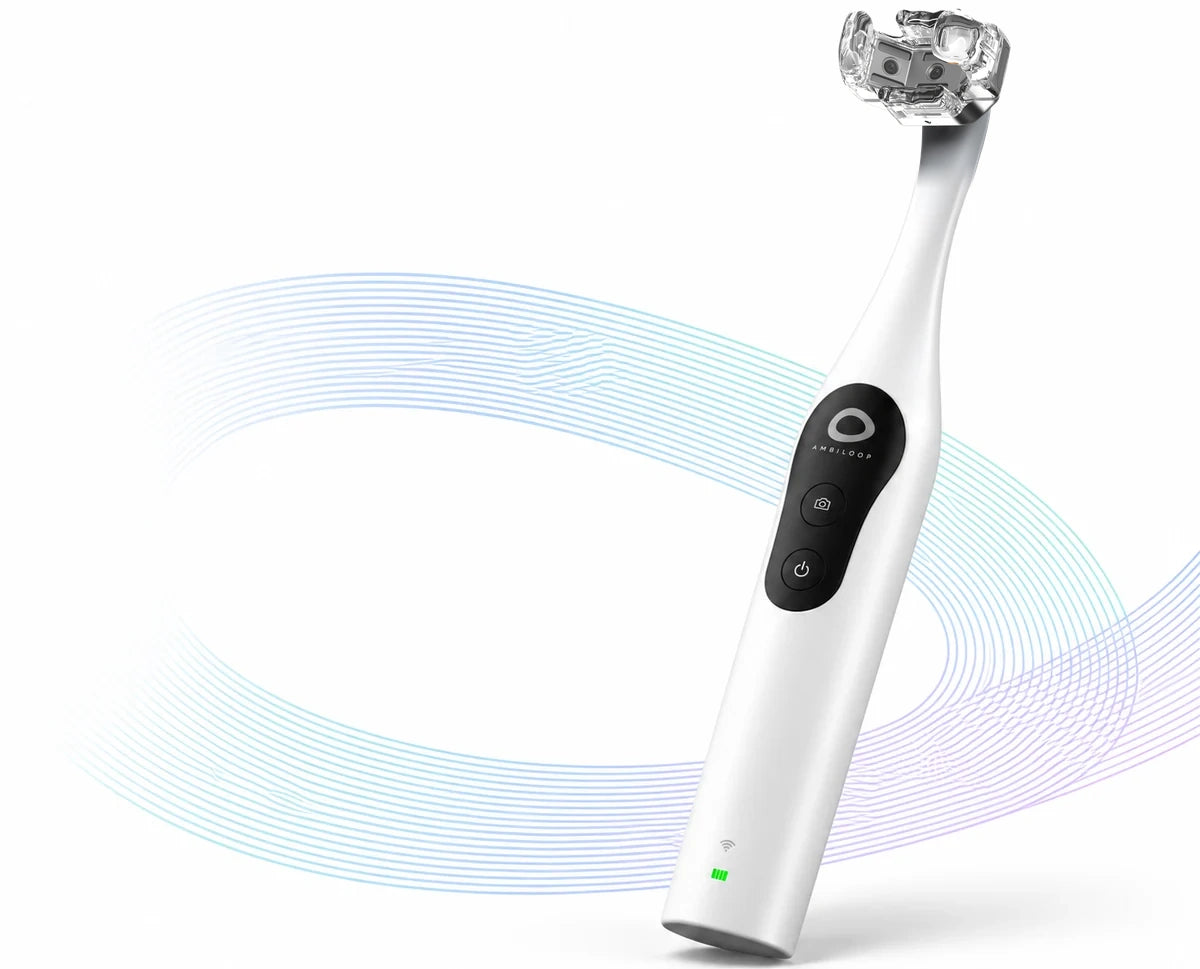
Ambiloop G 1
Photograph your teeth from three sides and see your gumline up close. Review earlier records, get general oral-care guidance from Ambi Coach, and share a report with your dentist.
See three sides of your teeth
Three cameras capture the outer surface facing your cheek, the biting surface where your teeth meet, and the inner surface facing your tongue.
Fit your personal mouthpiece, then follow the app to scan your upper teeth and
lower teeth separately.


Build your image history
Start with your first set of images as a baseline. Each new session is added to your timeline, giving you an earlier record to return to when you want to compare.

Take a closer look at the same area
Images are linked to tooth areas in the upper and lower sections of your mouth. Zoom in to compare the same area across earlier records.

Share a report with your dentist
Turn your images and history into a report. Preview it, then choose whether to share it with your dentist. It gives you a way to show the records and changes you want to discuss.

How to use Ambiloop
Turn a simple at-home scan into a clearer picture of your oral health—one you can revisit and track over time.
-

01Prepare
Attach the silicone guide and follow the in-app guidance to prepare for your scan.
-

02Capture
Follow the guided steps to scan your upper and lower teeth separately.
-

03Understand
Explore key visual indicators—including residue, gum appearance, enamel, and tooth color—in one easy-to-read summary.
-

04Track
Compare scans over time, get guidance from Ambi Coach, and share a report with your dentist when needed.


Everyday oral-care information with Ambi Coach
Ambi Coach uses information from your records to provide plain-language explanations and answer general oral-care questions. It does not diagnose dental conditions or replace advice from your dentist.

Individual profiles and personal mouthpieces
Each family member has a separate profile and image timeline and uses their own personal mouthpiece.


Specifications
- Model
- Ambiloop G 1
- Length
- 8.62 in (219 mm)
- Battery
- 3.7 V lithium-ion, 1200 mAh
- Battery life
- ≥100 min
- Cameras
- 3
- Lens type
- Macro
- Maximum resolution
- 1280 × 720 (720p)
- Field of view
- 140°
- Depth of field
- 5–50 mm
- LEDs
- 4 × 3
What’s in the box
-
 Ambiloop G 1 device× 1
-
 Personal mouthpieces× 2
-
 Charging cable× 1
-
 Instruction manual× 1
-
 Packaging box× 1


Product FAQs

Can family members keep separate records?
Each family member has a separate profile and image timeline and uses their own personal mouthpiece.
What is Ambiloop?
Ambiloop is an at-home oral imaging device. Use it to capture images of your teeth and gums, review earlier records, get general oral-care information from Ambi Coach, and create a report to share with your dentist.
Does Ambiloop replace visits to the dentist?
No. Ambiloop helps you keep and review oral images. It does not replace a dental exam or advice from a dentist.
Why use a dedicated device instead of my phone camera?
Ambiloop combines a three-camera device with a mouthpiece and an app for your records. You capture your upper and lower teeth in separate steps, then return to the same area in earlier images when you want to compare.
What does Ambi Coach do?
Ambi Coach uses information from your records to provide plain-language explanations and answer general oral-care questions. It does not diagnose dental conditions or replace advice from your dentist.
How is my information handled?
Our Privacy Policy explains what information we collect and how we use it. Contact our team if you have questions about your records.
Can I share my records with my dentist?
Yes. You can create a report from your images and history, preview it, and choose whether to share it with your dentist.
Reservation details
 Reservation A $1 USD reservation payment.

About Ambiloop
Learn why Ambiloop is built around keeping a record of your teeth and gums, and what the “loop” in our name means.